Domains
Add, enable and delete .test domains, understand their status, and set up Vite, Astro or Laravel to accept them.
The Domains tab (D) lists the project’s domains. Each one is served over HTTPS and forwarded to its local server.
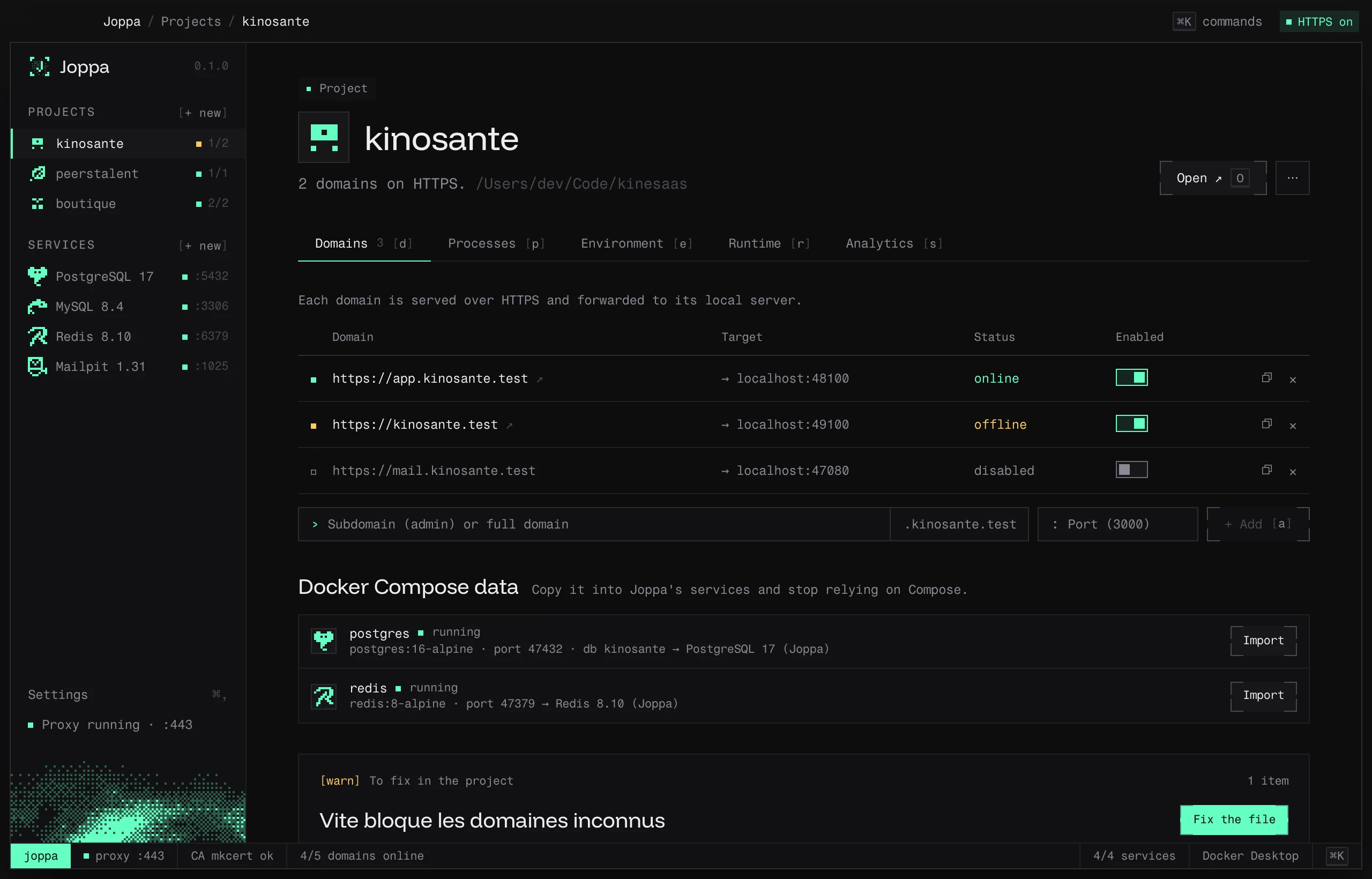
The domains table
| Column | Contents |
|---|---|
| Status | The domain’s health dot |
| Domain | https://app.myproject.test ↗, clickable |
| Target | → localhost:5173 |
| Started by | The process serving this port, if there is one |
| Enabled | A switch: a disabled domain stops responding, without being deleted |
Each row’s actions: start or stop the process, copy the URL, delete the domain.
Statuses
| Status | Meaning |
|---|---|
| online | The dev server responds on its port |
| offline | Nothing is listening on the port |
| disabled | The domain is turned off (Enabled switch) |
| no proxy | The proxy is stopped: no domain responds |
| starting… | The process serving this port is starting |
| process failed | The process crashed |
| stopped | The process is stopped |
Add a domain
Below the table, fill in both fields, then + Add (shortcut A to jump to the field):
- Subdomain (admin) or full domain:
adminbecomesadmin.myproject.test; a name with a dot (docs.other.test) is taken as is. - Port:
3000becomes the targethttp://localhost:3000.
Names accept the letters a–z, digits and hyphens, 63 characters per label and 253 in total. Two projects can’t have the same domain.
Framework settings
Below the domains, the To fix in the project block flags anything that would stop the project from responding on its domain, with the code to add.
Vite and Astro: allowedHosts
Vite (and Astro, which uses it) reject requests addressed to an unknown domain. Joppa offers to add:
// vite.config.ts
export default defineConfig({
  server: { allowedHosts: [".myproject.test"] },
});
// astro.config.mjs
export default defineConfig({
vite: { server: { allowedHosts: [".myproject.test"] } },
});Fix the file opens a preview, then Write the file inserts only those lines; the rest of the file stays as is. If the config has an unusual shape, Joppa leaves it alone: Copy code and paste it yourself. Another option, without touching the file: the __VITE_ADDITIONAL_SERVER_ALLOWED_HOSTS=.myproject.test variable.
Restart the dev server so it reloads its config.
Laravel behind a proxy
Laravel must trust the proxy to generate https:// URLs. In bootstrap/app.php:
->withMiddleware(fn ($m) => $m->trustProxies(at: '*'))This setting isn’t written automatically: copy it.
Forwarded headers
The proxy keeps the original Host header (app.myproject.test) and adds the X-Forwarded-* headers: X-Forwarded-Proto: https, X-Forwarded-Host, X-Forwarded-Port: 443 and X-Forwarded-For. See HTTPS proxy.